Purplex
Purplex

LeadTracker:
enquiries and follow-up

See which enquiries need a response, who owns them and what should happen next. LeadTracker brings customer communication, follow-up and pipeline progress into one place, so your team can continue the conversation with the relevant information in front of it.

Arrange a LeadTracker demonstrationExplore the approach

A specialist replies within one working day.

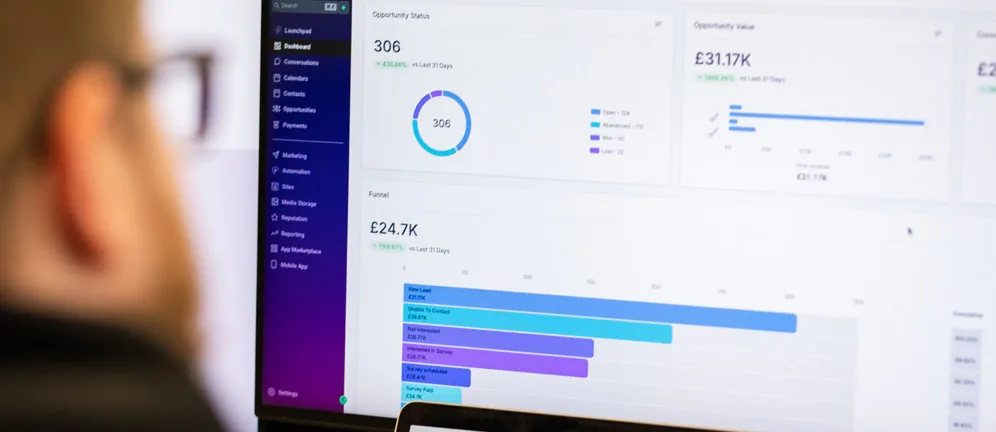
LeadTracker’s dashboard in use, showing enquiries, pipeline value and follow-up

LeadTracker and your sales process

An enquiry may involve several conversations before the customer is ready to decide. Your team needs a way to keep that context, prompt the next action and see the current position.

LeadTracker brings the website form, the phone call, the email and the message into one record for each customer, so whoever picks it up next knows what’s already been said. We review how your team sells and the systems it already uses before recommending the fit.

HS

A homeowner in Stockport

Bifold doors, survey requested

Quote sent
  1. Asked for a survey for bifold doors.Website form

  2. Confirmed the request and said who would call.Automatic reply

  3. Survey booked for Saturday morning.Phone call

  4. Survey reminder sent.Reminder

  5. Quotation sent. Follow-up set for Thursday.Email

  6. Asked for a Google review.Review request
Six channels, a website form, an automatic reply, a phone call, a reminder, an email and a review request, all recorded in one customer record in order.

What LeadTracker does for your team

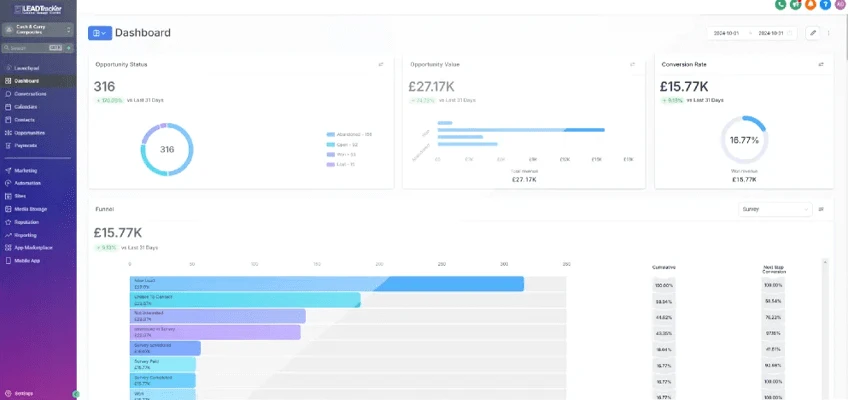
Published LeadTracker product illustration showing a pipeline dashboard
  1. Enquiries in one place

    Bring agreed lead sources and conversations into a common view, so the person responding can find the customer’s requirement and understand what has already happened.

  2. A clear next action

    Use pipelines, appointments and follow-up automation to support the stages your team agrees. Each opportunity needs an owner and a useful next action, including when the customer isn’t ready to proceed.

  3. Marketing sources and sales progress

    Connect the source of an enquiry with its progress through the pipeline. Sales and marketing can then discuss which opportunities are suitable, where follow-up stalls and what needs attention.

  4. Configuration and integrations

    The package, integrations and automation need to fit the process your team can maintain. We work through the requirements in the demonstration and confirm the available scope before recommending the setup.

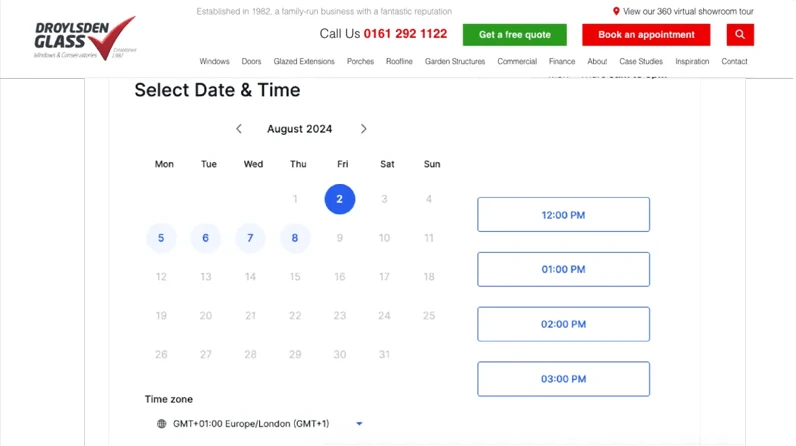
Published LeadTracker appointment booking illustration on a Droylsden Glass page

Appointment booking and customer communication

The demonstration should help you judge how booking and communication would work for your team. We use your enquiry journey to explore the tasks involved, the customer information needed and where a person takes over. That makes it easier to assess whether the platform fits the way you handle demand.

Bring a typical enquiry to the demonstration

Follow it from arrival through a conversation, an appointment and the next sales action. Check the information your team can see, the reminders it needs and the systems that would have to connect before deciding whether LeadTracker fits.

Your demonstration covers

  1. Where your enquiries arrive today
  2. Who picks them up, and how fast
  3. What a survey or appointment needs
  4. The reminders and follow-ups that slip when the team is busy
  5. The systems it would need to connect to

Questions about LeadTracker

If your question isn’t here, call 01934 808132 or email [email protected].

Is LeadTracker a CRM?

It covers the parts of a CRM a sales team uses every day: contacts, conversations, pipelines, appointments and follow-up, with the source of each enquiry kept alongside. Whether it should replace or sit beside your current system is something we work out with you.

Can it book appointments?

Yes. Customers can book from a web page, and reminders and confirmations can be sent automatically. The demonstration uses your own enquiry journey to show how that would work.

Will it fit the way my team works?

That’s what the demonstration is for. We follow a typical enquiry through your process and configure the stages, reminders and automation around it, not the other way round.

Do we have to change our other systems?

Not necessarily. We look at the systems you already use and what they need to share before recommending a setup.

Find out where your enquiries are leaking.

Free marketing review

A specialist looks at how your marketing brings in enquiries and shows you where they’re leaking.

  • The route from your website to an enquiry, on mobile and desktop
  • How customers find you in search, and who they find instead
  • What your campaigns, social and email are bringing in
Get my free marketing review

Talk to a specialist

Tell us what you need and where it’s stuck. We’ll come back to you within one working day with the right person for the job.

01934 808132[email protected]

Sam Cross, Commercial DirectorSean Scott, Growth DirectorEd Frater, Sales Director

A specialist replies within one working day. You’ll hear from someone who knows construction, building products and home improvement.

Send us your brief

Arrange a LeadTracker demonstration.

We can show you LeadTracker in the context of your own enquiry process. Let us know what you use now and what you’d like to improve.

01934 808132[email protected]
Your brief

We’ll only use your details to reply to this enquiry. Privacy notice